HighByte Intelligence HubFeatures

What can HighByte do? We grouped its capabilities; each group is based on the vendor’s current documentation.

Items marked “(4.5)” were introduced in version 4.5, released on 17 August 2026.

Connections

Connect devices, files, databases and systems through open standards and native connectors, configured in a code-free interface.

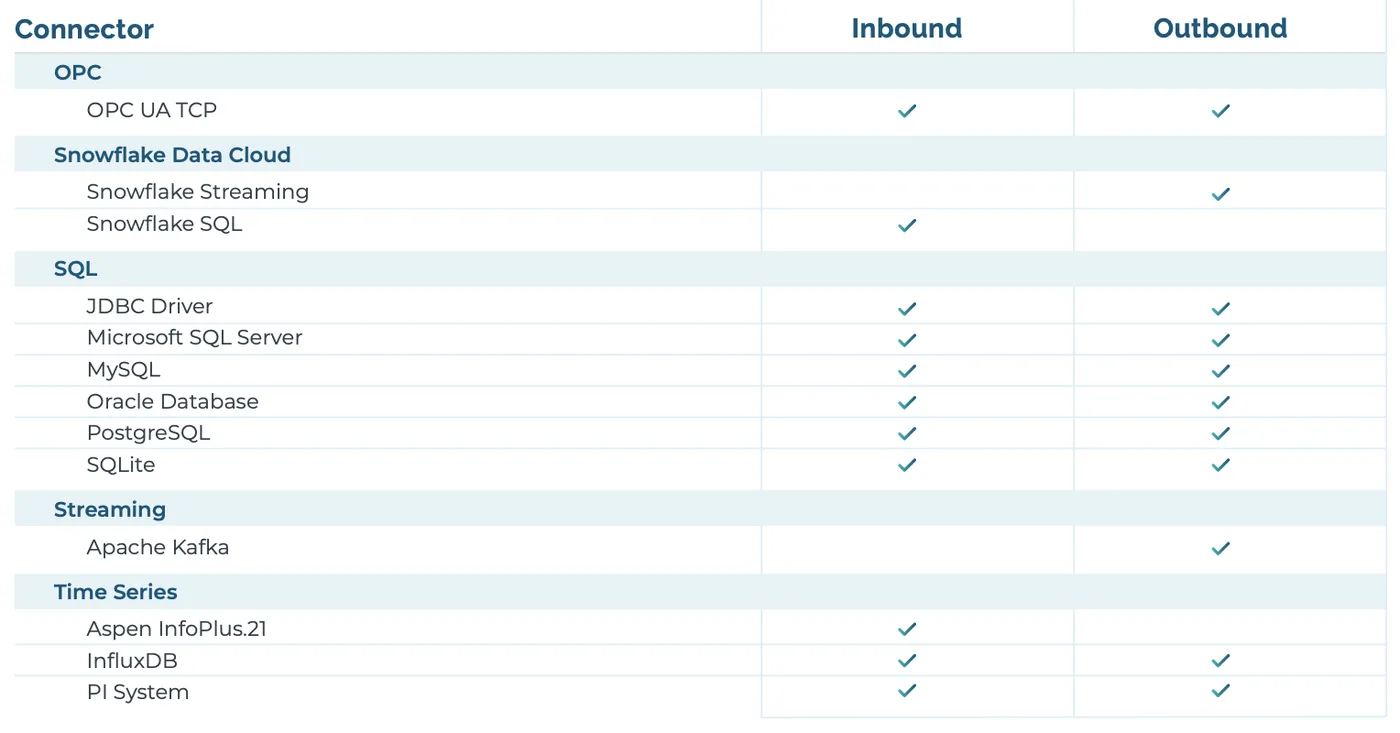
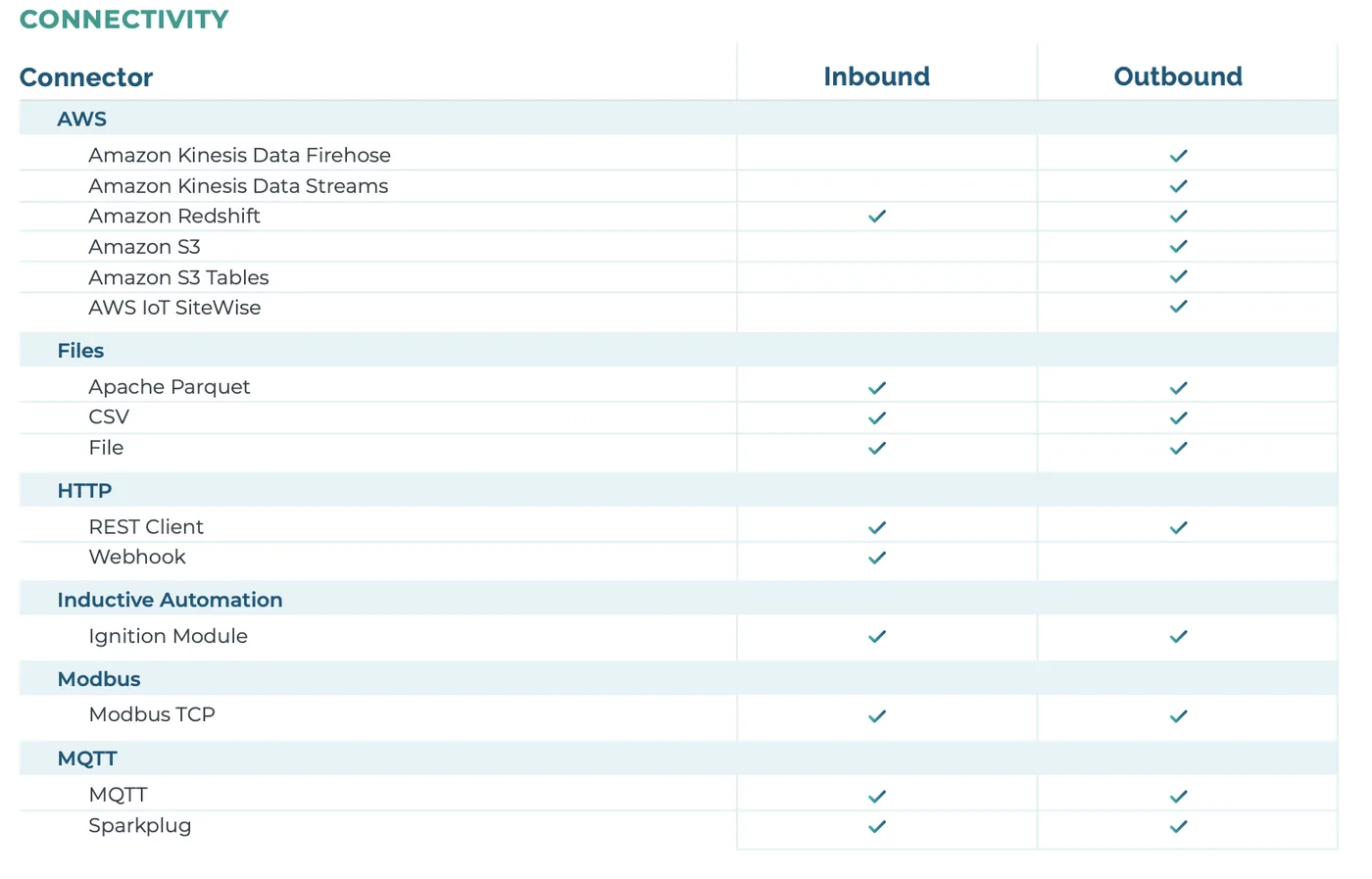
  • OPC UA, MQTT and Sparkplug, SQL, REST, Modbus TCP, files and the PI System; the full list is in the connector overview
  • Several inputs and outputs per connection; SQL and REST requests can use values from other systems
  • Native NATS connection and an i3X client connection (4.5)
  • Large files stream to Databricks, OneLake, Azure Blob or S3 without being loaded into memory (4.5)
  • OPC UA security policies up to Aes256_Sha256_RsaPss (4.5)
Connector overview, 1 of 2 (HighByte documentation)
Connector overview, 2 of 2 (HighByte documentation)

Models and instances

Represent machines, products, processes and systems with reusable templates, and merge data from several systems into one contextualised object.

  • Standardise attribute names, lists and units
  • Nested models through an attribute tree; import and export of template definitions
  • Model enums, user-set versions and Lookup Maps (4.5)
  • UANodeSet and JSON Schema import through Git deployments (4.5)
AttributeUnitSource
temperature°COPC UA
pressurebarSQL
stateenum: run · idle · faultMQTT
Illustrative example: a “Pump” model

Data conditioning

Clean and shape values at the edge, before they reach anything else.

  • Deadband filtering that calms jitter in a measurement
  • Aggregates: buffer fast data and output average, min, max, count and delta at a slower rate
  • Alarms on bad-quality or stale data
  • A transformation engine for calculations, logic, virtual properties and parsing complex strings
  • Global JavaScript functions and third-party JavaScript/Node packages in expressions
  • Raw: 74.19 · 74.21 · 74.20 · 74.22 · 74.18 · 76.9
  • Deadband 0.5 → only 74.19 and 76.9 are forwarded
How deadband works (illustrative)

Pipelines

Move raw data, modeled data or files between connections on an interval, on an event, or when called.

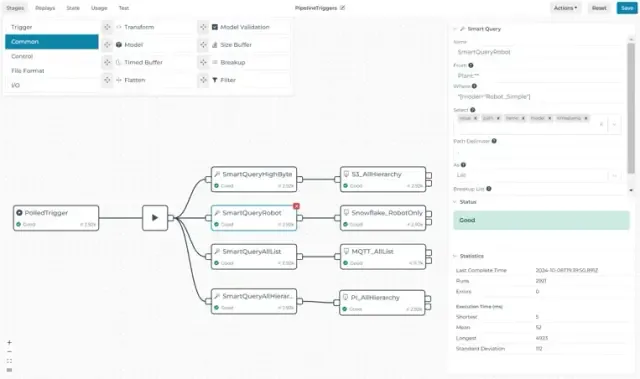
  • Graphical builder with stages to read, filter, buffer, transform, format and compress
  • Smart Query, On Change, Switch, Model Validation, For Each, While and Subpipeline stages
  • Store-and-forward that buffers to disk when a target connection is lost
  • Pipeline Debug: compare payloads, statistics and state side by side
  • Third-party observability platforms; OpenTelemetry pull support (4.5)
  1. Read
  2. On Change
  3. Smart Query
  4. Model
  5. Validate
  6. Write
A typical pipeline (illustrative)
Pipeline editor (HighByte documentation)

Namespaces and the embedded MQTT broker

Design a Unified Namespace or any destination with a hierarchical structure: MQTT topics, historian asset trees, SCADA/IIoT tag structures.

  • Namespaces organise datasets and their relationships hierarchically
  • Namespaces on remote hubs can be federated into a central hub
  • Embedded broker built by HighByte: MQTT v3.1.1 and v5, JSON and Sparkplug, enabled from the UI
  • UNS Client browses any MQTT broker, detects JSON, Sparkplug, text and raw binary, decodes Protobuf and can publish to topics
  • acme
  • istanbul
  • packaging
  • line-3
  • filler-02
  • temperature
  • state
Example namespace (illustrative, ISA-95 style)

REST data server and AI

Expose the same governed data to applications over HTTP and to AI agents over MCP, and speed up configuration with AI.

  • The REST Data Server exposes connections, models, instances, pipelines and values to any HTTP client
  • Industrial MCP Server: agents query connected systems for real-time or historical data; pipelines can be exposed as custom MCP tools
  • AI for DataOps: map sources to models with the LLM of your choice (Amazon Bedrock, Microsoft Foundry, Google Gemini, Anthropic, OpenAI)
  • The Modeling Agent browses OPC UA and SQL sources and accepts documents such as Excel files and P&ID PDFs (4.5)
  • The Data Lineage Graph shows configuration dependencies (4.5)

Deployment and operations

The same software from a single-board computer to an industrial server, at the edge or in the cloud.

  • Edge gateways, industrial switches, single-board computers, industrial servers, on-prem data centres or cloud
  • Bare metal, virtual machine or container; arm64 images (4.5)
  • A network of distributed hubs configured from one management portal; deployment without downtime
  • Single sign-on with SAML, Active Directory and OIDC (4.5)
  • Git import/export and backup on the Project page; /v2/livez and /v2/readyz health endpoints (4.5)
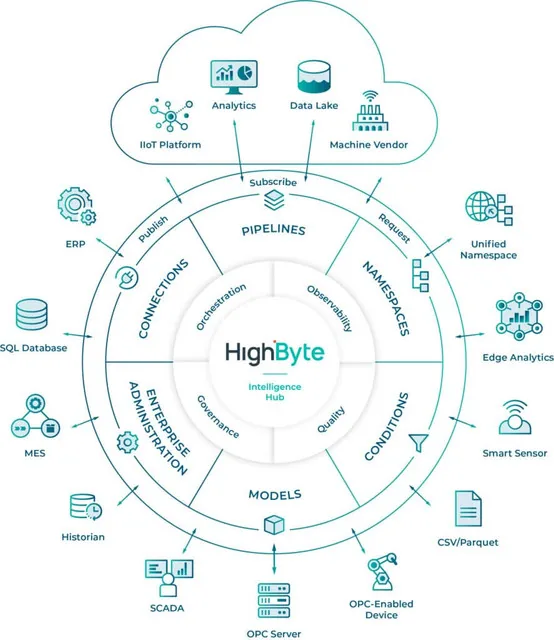
Intelligence Hub architecture diagram (HighByte)

Where it runs

At the edge

On gateways and industrial PCs next to the machine, so conditioning happens before data talks to the cloud.

On premises

A central hub in the plant data centre that collects the namespaces of remote hubs.

In the cloud

As a cloud VM or container, close to cloud targets such as Databricks, Snowflake, AWS and Azure.

Frequently asked questions

Which systems does HighByte Intelligence Hub connect to?

It connects through open standards and native connectors such as OPC UA, MQTT and Sparkplug, SQL, REST/HTTP, files and the PI System; version 4.5 added NATS and i3X client connections. The connector overview also lists Modbus TCP, Apache Kafka, CSV and Parquet files, InfluxDB, Aspen InfoPlus.21, Snowflake, AWS services and the Ignition module. See HighByte’s documentation for the exact connector list; we validate it against your sources together.

How is it different from a historian, SCADA or an ETL tool?

A historian stores time series, SCADA lets operators run the process, an ETL tool moves batch data. Intelligence Hub sits between them: it models and conditions the data and serves it to all of them in the same shape. It does not replace them, it feeds them.

Do I need a separate MQTT broker for a Unified Namespace?

Not necessarily. The hub includes an embedded broker with MQTT v3.1.1 and v5 and JSON and Sparkplug payloads, enabled from the UI. If you already run an enterprise broker, the hub can publish to that instead.

Can it run on small hardware?

Yes. HighByte states that it runs at the edge on single-board computers, industrial switches, IoT gateways and industrial servers. It installs on bare metal, a virtual machine or a container, and 4.5 added arm64 images.

How do AI agents reach the data safely?

Through the Industrial MCP Server. The agent reaches modeled data in the hub and the pipelines you choose to expose as tools, not the raw sources. What each tool can access is configured and traceable in the hub.

What is the current version and what did it add?

Version 4.5 was released on 17 August 2026: it includes the Modeling Agent, the Data Lineage Graph, expanded MCP configuration tools, NATS and i3X connections, OIDC single sign-on, Lookup Maps and model versioning. See HighByte’s release notes for details.

How do licensing and pricing work?

HighByte sets the licence terms. As ASP Dijital we prepare the quote for your needs and take care of deployment and support. Get in touch for current information.

Let’s take the first step with HighByte together

Tell us where you are and what you want to achieve, and we will outline the right scope and pilot plan. Our team replies within 24 hours.